Find and export evaluation records
Roles: Administrator, Clinical Coordinator, or Course Coordinator. Before you begin: Your course has an evaluation submission within the report's date range.
- Open Reports → Student Evaluations.
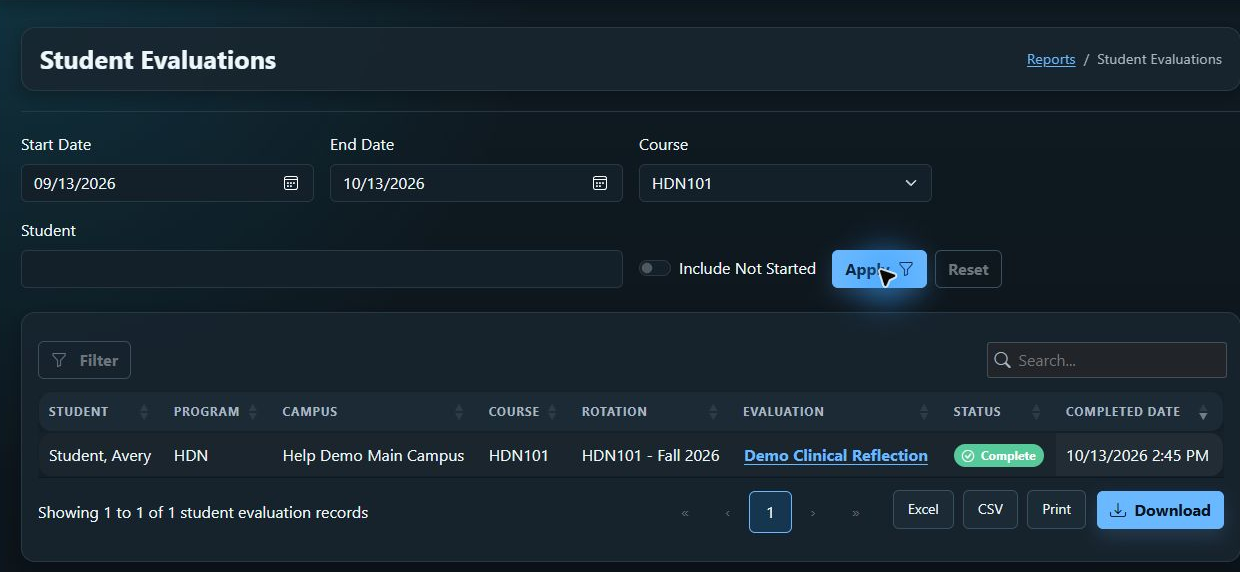
- Review Start Date and End Date. The demo used September 13–October 13, 2026.
- Select Course, such as HDN101, then select Apply.
- Review the rows. The table includes student, program, campus, course, rotation, evaluation, status, and completed date. The demo showed Avery's Demo Clinical Reflection as Complete.
- Select CSV to export the report table.
- Confirm the browser downloaded the CSV. The example produced Student Evaluations - Track My Clinical.csv with one demo record.
The page also provides a Student selector, Include Not Started, table Filter/Search, Excel, Print, and a separate Download action.
If the report is empty
Check the date range and selected course. Confirm that a submission exists; the demo appeared after an instructor completed its review. Available records depend on your role and course assignments.
See Assign a course evaluation and Save and complete an evaluation review.