Configure skills and competencies
Roles: Administrator, Clinical Coordinator, or Course Coordinator.
Define the skills available for student logs. Before starting, create a skills category. To map a skill, associate a competency map with the category and create its competency values.
Steps
- Open Settings → Skills Categories and select Manage in the category's Skills column.
- Select Add Skill.
- Enter the skill's Name. The demo uses Simulated structured handoff.
- In Competency, open Add competencies… and choose the relevant value. The demo selects COMM-1A, “Organize a concise simulated handoff using the program checklist.”
- Review Is Active. The demo leaves the new skill active.
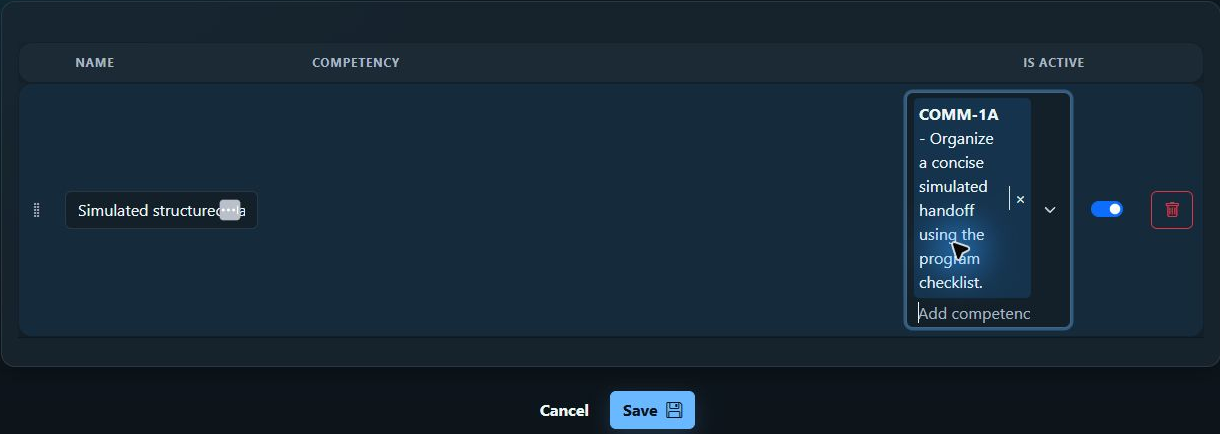
- Select Save.
- Reopen the category's Manage page. Confirm the skill name and competency selection persisted.
Common problems
- If competency choices are missing, check the category's optional Competency Map and the map's values.
- Save before leaving the editor, then reopen it to verify the result.
- Multiple competency selections, inactive skills, reordering, and deletion were not exercised in this walkthrough.