Complete an instructor-led skill checkoff
Roles: Course Coordinator or instructor assigned to the rotation group.
Record the student's observed performance against an assigned checkoff. Before starting, a coordinator must create the checkoff form and assign it to the course. The student must be assigned to your group.
Steps
- Open Rotations, select the rotation, and expand your group if necessary.
- Select Skill Checkoffs and find the student's row. The example starts with Avery's Demo Handoff Checkoff showing Not Started.
- Select the checkoff's name and confirm the student displayed on the form.
- Complete each required step. The demo form has one required text response; enter your actual observation when using your program's form.
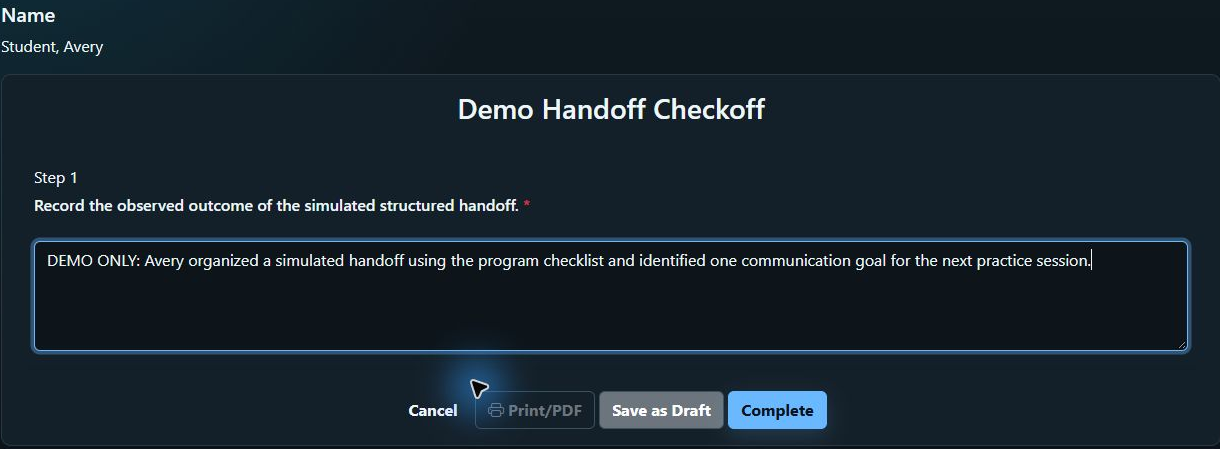
- Select Save as Draft when the work is unfinished. Confirm Draft in the group's table, reopen the checkoff, and check that your response persisted.
- When the required steps are finished, select Complete.
- Confirm Complete and Last Updated in the group's Skill Checkoffs table.
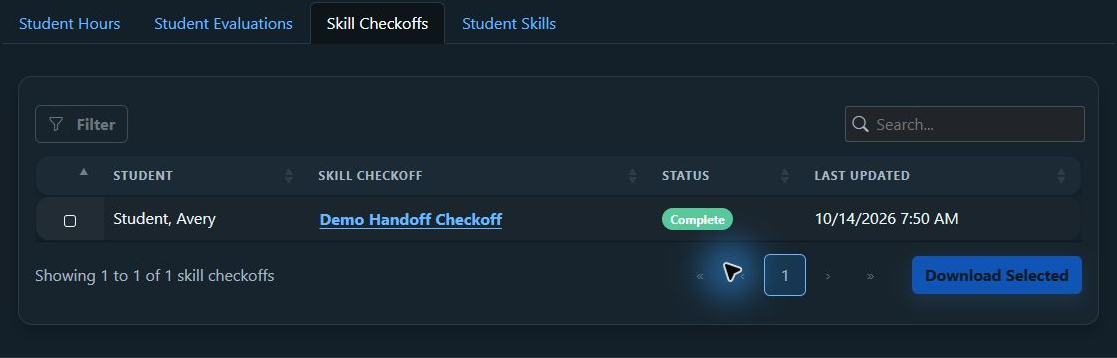
- To download the completed record, select its row checkbox and select Download Selected (1). The walkthrough downloaded one PDF successfully; bulk multi-row downloads were not exercised.
Common problems
- Skill Checkoffs is absent or empty: ask your coordinator to verify the course assignment and enabled program feature.
- Download Selected is disabled: select a row first.
- Required response missing: complete the fields marked with an asterisk before finishing.
- Verify the saved status after an action before retrying it.