Configure a preceptorship course
Roles: Administrator, Clinical Coordinator, or Course Coordinator.
Use this course setting for placements that require a preceptor. Before starting, complete the program, campus, and coordinator prerequisites in Add a clinical course.
Steps
- Open Settings → Courses → Add New.
- Enter Name, choose Academic Program(s) and any required Campus, and select Coordinator(s).
- Set Total Clinical Hours and review Display Color. The walkthrough uses HDN201, HDN, MAIN, Casey Course Coordinator, and 120 hours.
- Turn on Is Preceptorship. The form says that a preceptor must be assigned to rotations for this course and that students can manage their rotation dates.
- Set # Site Visits Required. The walkthrough uses 1; the form describes this as primarily a reporting value.
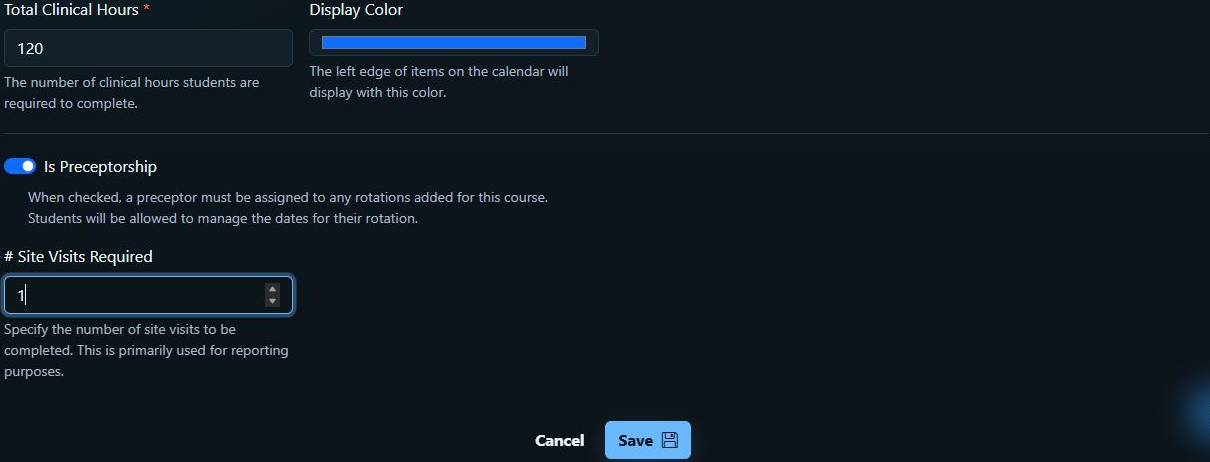
- Select Save and confirm the success notification and course in the list.
- Reopen the course and verify Is Preceptorship, the required visits, and clinical hours persisted.
Common problems
- Campus-enabled programs require a campus selection.
- The preceptorship setting changes rotation requirements. Course configuration was saved and reopened in this walkthrough; preceptor assignment, student-managed dates, and site-visit completion remain to be verified separately.